

Last updated: October 2026.
Technical SEO is the work of making a website easy for Google to crawl, render, index and trust, before any content or link building happens. This guide explains what technical SEO covers, the checks worth running first, and the specific fixes that matter most for Australian businesses in 2026.
Key takeaways
- Google uses the mobile version of a page, crawled with the smartphone agent, for indexing and ranking, so the mobile site is the one that counts (Google Search Central, 2026).
- Core Web Vitals are judged at the 75th percentile of real page loads, not in a lab: LCP of 2.5 seconds or less, INP of 200 milliseconds or less and CLS of 0.1 or less (web.dev, 2026).
- robots.txt controls crawling rather than indexing, so a page blocked in robots.txt can still be indexed if other pages link to it.
- A canonical tag is the correct fix for duplicate URLs, and most duplicate problems on Australian small business sites come from filters, pagination and www versus non-www versions.
- Technical problems are the most common reason a good page never gets the chance to rank, which is why fixes come before more content.
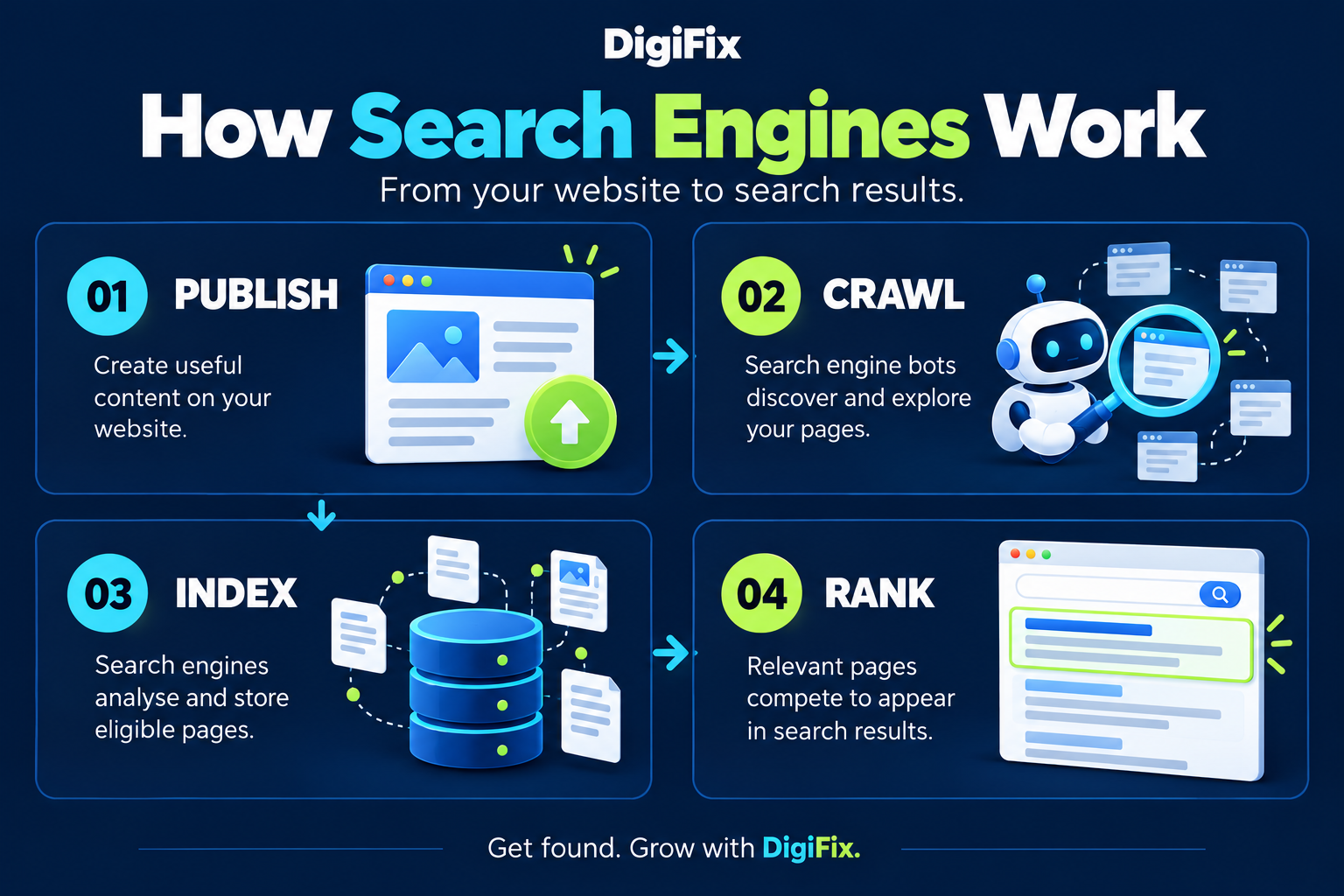
What is technical SEO?
Technical SEO is a set of behind the scenes improvements that let search engines reach a page, understand it and store it. It covers crawling and indexing, canonical tags and redirects, site speed, mobile rendering, HTTPS, site architecture and structured data.
None of it is visible to a visitor when it is working correctly. That is exactly why it gets skipped, and why a site can have excellent content and still receive no traffic from Google.
| SEO type | What it covers | A typical fix |
|---|---|---|
| Technical SEO | How a site is crawled, rendered, indexed and served | Removing a noindex tag left on a service page |
| On page SEO | What each page says and who it says it to | Rewriting a title tag and headings around buyer intent |
| Off page SEO | Signals from other sites and profiles | Earning a link from a local industry directory |
| Local SEO | Visibility for searches with a place attached | Completing a Google Business Profile and matching the address |
How technical SEO differs from on page SEO
On page SEO decides which query a page deserves to rank for, while technical SEO decides whether the page can be read at all. A page with perfect headings and no crawlable content will not rank, and a technically flawless page about nothing useful will not rank either. Fixing the technical layer first removes the possibility that good work is being wasted.
Does technical SEO still matter for AI search?
Technical SEO matters more than ever now that answers are generated rather than listed, because an AI system can only quote content it can reach. Google’s guidance on AI features and your website confirms that AI Overviews and AI Mode are built on the same Googlebot crawl and the same index as normal search results (Google Search Central, 2026). Nothing extra is required for Google, and nothing is possible without a clean crawl.
How does Google crawl a website?
A search engine finds pages by following links, reading XML sitemaps and revisiting URLs it has seen before. Crawling is the discovery stage, and Googlebot decides how often to return based on how often a site changes and how healthy it is.
For most small business sites the crawl is not the problem and never needs optimising. Crawl budget only becomes a real constraint on sites with tens of thousands of URLs, or sites that generate endless filter and calendar pages, as Google explains in its guidance on managing crawl budget (Google Search Central, 2026).
How to see what Google has crawled
- Search Console Crawl Stats report for total requests, response codes and file types
- URL Inspection tool to test a single page and see the crawled HTML
- robots.txt report to confirm which rules Google has read and which files are blocked
- Server log files when a site is large enough that sampling is not enough
If you are new to the tool, the walkthrough on setting up Google Search Console covers where each of those reports lives.
What a sitemap actually does
An XML sitemap lists the URLs a site wants indexed, and it helps discovery rather than guaranteeing anything. Google’s sitemap documentation states that submitting a sitemap is a hint, not a directive, and that internal links remain the strongest signal of importance (Google Search Central, 2026). Submit the sitemap in Search Console, keep it free of redirects and 404s, and then improve internal linking on the pages that matter.
How do you get new pages indexed in Google?
Indexing happens when Google stores a page and considers it eligible to appear in results. A page can be crawled many times and still never be indexed, and the usual reasons are a noindex directive, a canonical pointing elsewhere, thin content, or no internal links pointing at it.
The fastest way to check a specific URL is the URL Inspection tool in Search Console, which reports whether the page is indexed and, when it is not, names the reason.
What robots.txt does and does not do
robots.txt tells crawlers which parts of a site they may not request. Google’s robots.txt introduction is explicit that this file controls crawling, not indexing, so blocking a URL does not remove it from results (Google Search Central, 2026). Use robots.txt for crawl control and the noindex meta tag for removal from search.
| Goal | Use this | Not this |
|---|---|---|
| Keep a page out of results | noindex meta tag | robots.txt disallow |
| Save crawl resources | robots.txt disallow | noindex meta tag |
| Move one URL to another permanently | 301 redirect | 302 redirect |
| Consolidate near duplicate URLs | rel canonical | noindex on the duplicate |
When should you use a canonical tag?
Use a canonical tag when the same content is reachable at more than one URL and you want the signals consolidated onto one of them. Google’s guidance on consolidating duplicate URLs treats rel canonical as a hint that Google may override, which is why the tag has to agree with the internal links, the sitemap and the redirects (Google Search Central, 2026).
Duplicate URLs are common on Australian small business sites, and they almost always come from the same handful of causes.
- Both www and non www versions resolving, or http and https both live
- Trailing slash and no trailing slash variants of the same page
- Ecommerce filters and sort parameters generating thousands of near duplicate URLs
- Pagination creating page two and page three versions of the same content
- Session IDs or tracking parameters appended to internal links
The fix is to choose one version, redirect the rest, and make sure every internal link points to the chosen version. Content duplication between pages is also worth cleaning up, and the guide to optimising website content covers how to merge overlapping pages rather than leaving two weak ones competing.
Which technical SEO fixes matter most?
Fixes should be ranked by how much traffic they are currently costing, not by how interesting they are. On most sites, a small number of problems account for the majority of the lost visibility.
| Priority | Fix | What it recovers | Effort |
|---|---|---|---|
| 1 | Remove noindex from revenue pages | Pages that were never eligible to rank | Low |
| 2 | Fix 404s and broken internal links | Crawl paths and lost link values | Low |
| 3 | Resolve duplicate URLs and canonicals | Split ranking signals across variants | Medium |
| 4 | Compress the hero image and clear render blockers | Slow Largest Contentful Paint | Medium |
| 5 | Submit the sitemap and fix orphan pages | Pages Google had no path to | Low |
| 6 | Add structured data to key page types | Eligibility for rich results and clearer machine reading | Medium |
Why is site speed part of technical SEO?
Site speed is part of technical SEO because Google measures the real loading experience of real visitors and uses it as a ranking input. The measurements are the Core Web Vitals, and they are assessed in field data at the 75th percentile of page loads, not from a single test in a lab tool.
| Metric | What it measures | Good | Poor |
|---|---|---|---|
| LCP | Largest Contentful Paint, when the main element appears | 2.5 seconds or less | Over 4 seconds |
| INP | Interaction to Next Paint, how quickly the page responds | 200 milliseconds or less | Over 500 milliseconds |
| CLS | Cumulative Layout Shift, how much the layout jumps | 0.1 or less | Over 0.25 |
Those thresholds are the published definitions from Google’s Core Web Vitals documentation (web.dev, 2026). A PageSpeed Insights score is useful for diagnosis, but it is a lab estimate and it is not the number Google uses for ranking.
What to fix first on a slow page
- Compress and correctly size the largest image, because an oversized hero is the single most common cause of a poor LCP
- Set explicit width and height on images and reserve space for ads or banners, which removes most layout shift
- Defer or remove render blocking JavaScript that is not needed for the first screen
- Enable server level caching and a CDN so the first byte arrives quickly for Australian visitors
- Reduce the number of plugins or third party scripts loading on every page
Speed work has a practical limit, and it is worth knowing where it sits. The article on website speed and SEO explains why speed acts more like a tie breaker than a trump card, and when a rebuild is worth it.
Not sure which technical issues are costing you traffic?
DigiFix runs technical audits for Australian businesses and reports the fixes in priority order, in plain English, with the impact of each one explained.
How does mobile-first indexing change the work?
Mobile-first indexing means the mobile version of a page is the version Google indexes and ranks. Google’s mobile-first indexing documentation states that Google uses the mobile version of a site’s content, crawled with the smartphone agent, for indexing and ranking (Google Search Central, 2026).
This is not a theoretical concern in Australia, where there were 34.1 million mobile connections in late 2025, equal to 126 per cent of the population (DataReportal, Digital 2026 Australia).
| Desktop only habit | Why it breaks on mobile |
|---|---|
| Hiding content with display none on small screens | Hidden mobile content may be treated as missing content |
| Tables that only fit on a wide screen | Content is cut off or causes horizontal scrolling |
| Tap targets smaller than a fingertip | Calls to action become unusable and frustrate visitors |
| Full screen pop ups on arrival | Intrusive interstitials block the mobile content |
Test on a real phone rather than a resized desktop browser. Most mobile defects are obvious within thirty seconds of using the site on a handset with an average Australian mobile connection.
How do you use structured data without causing problems?
Structured data is code that describes a page in a format search engines understand, and in most cases it should be added through an existing plugin rather than hand written. The rule that matters is that the markup must describe content the visitor can actually see, as explained in Google’s structured data documentation (Google Search Central, 2026).
Rank Math is already installed on this site and outputs a single connected graph of schema, which is the correct pattern. Adding a second hand written block of the same type creates two competing declarations, and Google then has to choose one of them. The practical approach for FAQ content is covered in the guide to using FAQs to improve SEO performance.
Which schema types are worth adding
- Organization and LocalBusiness on the homepage, with the name, address and phone matching Google Business Profile exactly
- BreadcrumbList on every page that shows breadcrumb navigation
- Article or BlogPosting on blog posts, with an author that resolves to a real profile
- FAQPage where a page genuinely contains visible question and answer pairs
- Product and Offer on ecommerce pages, with price and availability
Validate everything with the Rich Results Test for eligibility and the Schema.org validator for correctness. The two tools catch different faults, and passing one is not evidence of passing the other.
What does technical SEO look like for AI answers?
For AI answers the technical work is mostly the same work, done properly, because a system cannot quote a page it cannot crawl. If a page is blocked, noindexed, JavaScript only, or buried behind an interstitial, it will not appear in an AI generated answer regardless of how well it is written.
Beyond the basics, three things make a page easier for an answer engine to reuse.
- Render content in HTML rather than injecting it with JavaScript, so the text is present in the crawled source
- Answer the question in the first two sentences of each section, so the passage still makes sense when it is lifted out
- Keep headings phrased as the questions people actually type, so the section is matched to the right prompt
Google’s AI features run on the standard Googlebot crawl, so nothing extra is needed to be eligible there. Other AI companies operate their own crawlers, so a site blocking unknown user agents in robots.txt will also be blocking those systems from reading it, which is worth checking before assuming the content is available.
How do you know technical SEO is working?
Technical SEO is working when the number of indexed pages stops falling, crawl errors stop appearing and the pages that should rank become eligible to. Unlike content work, the results show up as the absence of a problem rather than a dramatic jump in traffic.
| Check | Where | How often |
|---|---|---|
| Indexed versus not indexed pages | Search Console Pages report | Monthly |
| Server errors and 404 spikes | Search Console Crawl Stats | Monthly |
| Core Web Vitals status | Search Console field data report | Monthly |
| Rich results eligibility | Search Console and Rich Results Test | After any template change |
| Broken internal links | Site crawler of your choice | Quarterly |
If the reports are hard to interpret, the guide to reading an SEO audit report explains which flags deserve action and which are noise, and the SEO glossary defines the terms used across those reports.
Want the fixes prioritised for you?
DigiFix publishes the sites and campaigns it has worked on, including the technical work behind the results.
What does this look like for a Melbourne trades site?
The starting point
A Melbourne plumbing business has a 60 page WordPress site built in 2019 and a Google Business Profile that stopped being updated. Organic enquiries have fallen for a year, and the owner has been told the site needs more content.
What DigiFix would do, in order
- Run a crawl and find the pages that are not indexed, in week one
- Remove the noindex tag that a staging plugin left on 12 service pages, in week one
- Redirect the www and non www versions to one host and confirm HTTPS everywhere, in week two
- Compress the hero images across the top 10 pages, which is where the slow LCP lives, in weeks two and three
- Rebuild internal links so every service page is linked from the homepage and the main hub page, in weeks three and four
- Fix the structured data on the homepage and add Article markup to the blog, in week four
What it costs to wait
Publishing more content onto a site with 12 unindexable service pages adds cost and fixes nothing. The business keeps paying for blog posts that sit on a site Google cannot fully read, while the pages that would generate plumbing enquiries stay invisible.
Is your site in the same position?
Bring your site and Search Console access to a short call and DigiFix will tell you which technical problems to fix first, and in what order.
What other technical SEO questions do owners ask?
How long does technical SEO take to show results?
Technical fixes usually show up in crawling and indexing within two to four weeks, while ranking and traffic changes take longer. Removing a noindex tag or resolving a redirect chain can restore pages quickly because the obstacle is gone. Speed and mobile improvements are closer to a tie breaker, so they rarely produce a visible jump on their own.
Do I need a developer to do technical SEO?
You need a developer for some fixes and not for others. Redirects, canonicals, robots.txt and server caching usually need code or hosting access, while indexing checks, sitemap submission, image compression and Search Console work sit within reach of any site owner. A practical split is for the owner to run the audits and a developer to action the code level items.
What is the difference between crawling and indexing?
Crawling is the discovery of a URL, and indexing is the decision to store it and make it eligible for results. A page can be crawled daily and never indexed, which is why the two reports in Search Console are read separately. Search Console will report a page as crawled with the reason it was excluded from indexing.
Is HTTPS still a ranking factor?
HTTPS is treated as a light ranking signal, but the bigger issue is what happens without it. Browsers warn visitors that a site is not secure, which costs trust and conversions long before it costs rankings. Every Australian business site should run HTTPS across the whole domain, including old URLs that still resolve.
How often should a technical SEO audit be run?
A full crawl every quarter, plus a check after any site change, template update or plugin install. Most technical problems are introduced by a change rather than appearing gradually, so the highest value check is the one run straight after a deployment. Search Console alerts and coverage reports cover the rest between audits.
Can a technical problem get a site penalised?
Most technical problems prevent a page from ranking rather than triggering a penalty. Genuine manual actions come from spam practices such as cloaking, hidden text, doorway pages or paid links, not from a stray 404. The exception worth watching is a business name or description stuffed with keywords on a Google Business Profile, which risks suspension instead.
Does crawl budget affect small sites?
Crawl budget rarely matters for a small site, because Google will happily crawl a few hundred well linked pages. It becomes a real constraint on sites with tens of thousands of URLs, or sites generating endless filter, sorting and calendar combinations. For those sites the fix is removing the pointless URLs, not asking Google to crawl harder.
Should structured data be hand coded or added by a plugin?
Use a plugin for the standard types, and only hand code where a page needs something a plugin does not cover. Hand written markup is easy to break in a template update and easy to duplicate, and a duplicate declaration of the same type forces Google to choose between them. Rank Math already covers Organization, LocalBusiness, Breadcrumb and Article on this site.
Technical SEO is the least glamorous part of search and the part most often skipped. If a site cannot be crawled, indexed and served quickly, no amount of new content will fix the outcome. More background on how the pieces fit together is on the DigiFix blog, and the wider digital marketing services page covers how technical work sits alongside content and links. You can also read about the team behind the work.
Get a straight answer about your own site
Tell DigiFix what you sell and where you sell it. You will get a clear view of what is blocking your visibility and what it would take to fix it.