

How to Perform an SEO Audit in 2026: 50 Checks That Actually Matter
SEO audits are no longer about running a crawler, exporting a report, and fixing a handful of red warnings. In 2026, that kind of audit is mostly admin work.
A thorough SEO audit is now a decision-making process. It shows you what search engines can crawl, what they choose to index, which pages they see as worth ranking, and where your site is losing momentum. That loss usually occurs quietly through crawl waste, weak internal signals, content overlap, outdated page angles, and pages that no longer align with the search results they are trying to achieve.
This guide is built for how SEO works now, not how it worked five years ago.
You will get 50 practical checks across six areas:
- Technical SEO
- Indexation and architecture
- Content and search intent
- On-page signals
- Internal linking and authority flow
- Performance and validation
You will also discover a simple priority framework, so you know what to fix first. Because that is the real difference between a useful audit and a useless one. A useful audit shows a path. A useless audit gives you homework.
Also, if you are looking for help with your businesses’ SEO tasks, DigiFix is more than happy to be your SEO partner. With more than 10 years of experience, we have helped many Australian businesses boost their rankings and reach more customers. We offer the 1st consultation for FREE. If you like to contact us and find out more about our SEO services, please visit our website : Our SEO Services
What Does an SEO Audit Really Mean in 2026?
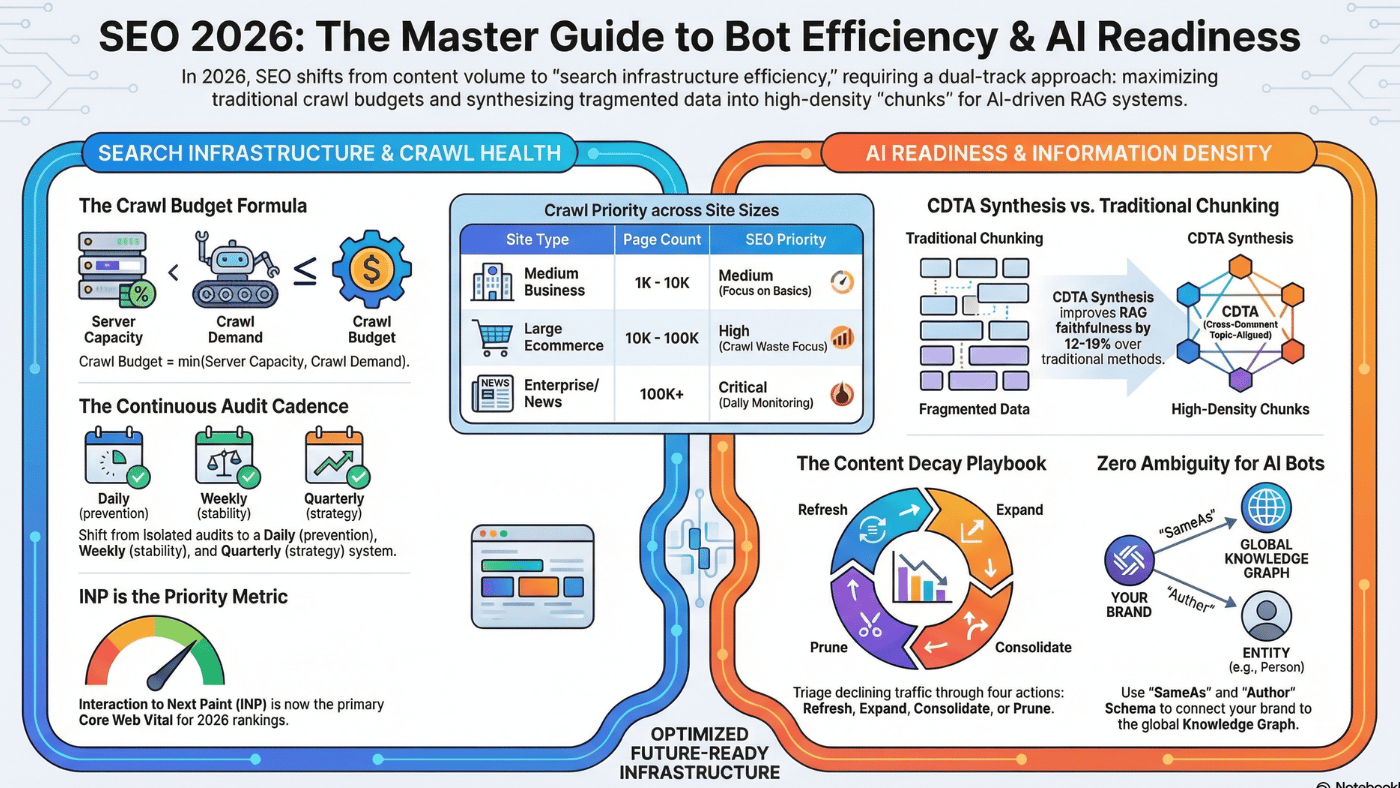
Most websites do not lose traffic because Google suddenly changed everything. They lose traffic because the site drifts out slowly of alignment with how search actually works.
That drift shows up in familiar ways:
- Google crawls the easiest URLs, not always the most important ones.
- Indexation becomes selective, especially on large or messy sites.
- Search results change format, so the page that used to match the query no longer fits.
- Multiple pages start targeting the same topic.
- Internal links reinforce old priorities instead of current business goals.
- Content becomes dated even when it is technically still accurate.
That is why an audit matters.
An SEO audit is not just a technical review. It is a way to answer three hard questions:
- Where is Google wasting attention?
- Which pages deserve to rank, and which ones are just taking up space?
- Does the page format still match what the search results are rewarding?
If you cannot answer those three things clearly, your SEO work will be more challenging than it should be.
What I Look for in Every Audit:
Every audit starts with the same objective: separate noise from leverage.
- Where is crawl attention being wasted?
Crawl waste is not theoretical. It is visible.
It shows up in faceted URLs, parameters, thin pages, filter combinations, internal search pages, archive pages, outdated templates, and duplicate paths. When too much crawl activity goes to low-value URLs, your best pages get less attention than they need.
- Which URLs are truly competitive?
A page can be indexable and still have no chance to rank. Some pages are worth investing in. Some should only support stronger pages. Some should not exist in search at all. A strong audit sorts those groups properly.
- Does the page still fit the current SERP?
This is where a lot of audits go weak.
You can have the right keyword and a decent page, but still underperform because the SERP changed. Maybe the query now favors:
- short answer pages
- video content
- local pages
- comparison pages
- category pages
- list-style content
If your page type is no longer what Google rewards, no amount of small optimization will fix the plateau.
More Interesting Articles: Step by Step guide on how to do an SEO audit
What a Good SEO Audit Should Produce?
A proper SEO audit should not end with a giant spreadsheet full of warnings, scores, and disconnected tasks. That is not a strategy. That is just a backlog.
A useful audit should leave you with four clear outputs: what must be fixed first, what can create growth fastest, what can be scaled across the site, and how you will keep the same problems from recurring.
- Fix-first work
This is the first output every audit should produce.
Fix-first work includes the issues that hold everything else back. These are the problems that weaken how Google crawls the site, interprets the site, or chooses which pages to trust and index. If these issues are left unresolved, even strong content and strong links will underperform.
In most audits, this includes things like:
- Important pages are not being crawled often enough.
- low-value URLs absorbing too much crawl attention
- canonicals pointing to the wrong versions
- noindex, robots, and sitemap signals not lining up
- Redirect chains are slowing down discovery and wasting authority.
- internal links pointing to non-preferred or redirected URLs
- structural problems that make key pages too deep or too isolated
This work feels less exciting because it is not always visible in the SERP right away. But it matters because it removes the friction that makes everything else harder.
Think of it this way: if the site is sending mixed signals, Google has to guess. And when Google has to guess, your best pages often do not get the support they deserve.
Fix-first work gives the site a cleaner foundation. It helps search engines spend more time on the right URLs, understand which versions are preferred, and stop wasting attention on pages that should not be competing in search.
Without this step, later improvements often produce weaker results than expected.
- High-impact upgrades
Once the foundation is stable, the audit should identify where growth is fastest.
These are the pages that are already closed. They may already rank on page one or near the top of page two. They may already get impressions, but underperform on clicks. They may already have some authority but are missing better intent alignment, stronger internal support, or a clean on-page structure.
This is where easy wins are hiding.
High-impact upgrades often include pages that:
- rank in positions 4 to 15 for valuable queries
- have good impressions but weak CTR
- match the topic but not the current SERP format
- are being outranked by slightly better-structured competitors
- have weak internal link support compared with other pages in the same cluster
- target the right query, but do not fully cover the decision points users expect
These pages do not need a complete rebuild. They need sharper alignment.
That may mean:
- adjusting the page to match search intent more closely
- improving the headline and title to earn more clicks
- expanding sections that are missing key subtopics
- tightening the structure so the page is easier to scan
- strengthening internal links from relevant pages
- removing mixed messaging that makes the page feel unfocused
This output matters because not every page deserves equal attention. A good audit tells you where a small amount of work can produce a meaningful lift.
Instead of trying to improve everything, you focus on the URLs with the highest probability of movement.
- Batch work
A strong audit should also show you where changes can be scaled.
This is one of the most important outputs on larger sites. If a problem appears across a template, category, or page type, fixing individual URLs one by one is inefficient and usually short-lived. The better move is to identify the pattern and solve it at the system level.
That is what batch work is for.
Batch work includes changes that can be rolled out across many URLs at once because the issue is repeatable. These are not one-off fixes. They are structural or template-based improvements.
Examples include:
- Rewriting title tag patterns across a set of category pages
- fixing canonical logic on one template that affects hundreds of URLs
- improving heading structure across all location pages
- Adding missing internal links from hub pages to support pages
- noindexing a repeatable low-value page type
- updating intro copy across a cluster of service pages
- improving schema implementation across article templates
- cleaning up redirect behaviour across an old directory structure
This kind of work creates leverage. One well-planned rollout can improve dozens or hundreds of pages.
More importantly, batch work prevents teams from wasting time solving the same issue repeatedly. If the CMS, template, or internal process keeps generating the problem, manual cleanup will never keep up.
A good audit should clearly separate what needs a page-by-page review from what should be handled as a scalable rollout.
That makes execution faster and results more durable.
- A repeatable audit cycle
The last output is the one most teams skip.
A good audit should not just solve today’s issues. It should make future audits easier, faster, and more useful.
That means the audit should produce a repeatable cycle.
Without a repeatable cycle, teams fall into the same pattern every quarter:
- run a crawler
- Find a familiar set of issues.
- fix a few scattered things
- lose track of what changed
- Repeat the process again later.
That is not progress. That is maintenance without memory.
A repeatable audit cycle builds a better system. It tells you:
- How often should you review key sections of the site?
- Which templates or clusters should be audited first?
- What metrics to monitor after each round of changes
- How to track what was fixed, when it was fixed, and what happened next
- How to prioritise the next round based on impact, not noise
In practice, this usually means moving away from full-site audits every time and instead working in controlled cycles.
For example:
- Audit one template or section at a time.
- Ship changes in batches.
- Validate results in Search Console and crawl data.
- Document what improved and what did not.
- Then move to the next slice.
This approach is better because SEO is not static. Search intent changes. SERPs change. content ages. New technical problems appear. Internal linking drifts. If you treat audits as a one-time project, the site slowly becomes messy again.
A repeatable cycle stops that drift. It turns the audit from a stressful event into an operating system for improving the site over time.
In Simple Terms,
A good SEO audit should leave you with:
1) Foundation to clean up: The issues that are blocking everything else
2) Shortlist of growth opportunities: The pages most likely to improve with focused work
3) A set of scalable fixes :the patterns you can solve once and roll out widely
4) Process you can repeat: So SEO improvements stack instead of resetting every few months
That is what a real audit should produce.
Not just more tasks.
Not just more screenshots.
Not just another report.
It should produce direction, leverage, and a clearer path to growth.
50 Checks to Focus when Doing an SEO Audit
Technical SEO & Crawl Checks
Before worrying about content, keywords, or backlinks, you need to make sure one thing:
Google can properly access and understand your website
If this part is messy, everything else becomes harder.
1. Control Which Pages Google Can Index
This means: You decide which pages on your website should be allowed to appear in Google search results and which pages should stay out.
A lot of beginners assume: “If a page exists on my website, it should be on Google.”
That is not true. In fact, one of the most common SEO mistakes is letting too many useless pages get indexed.
First: What does “indexed” mean? When Google indexes a page, it means:
- Google has found the page
- Google has read the page
- Google has stored the page in its system
- the page is now eligible to appear in search results
So if a page is not indexed, it usually will not show in Google.
Why not every page should be indexed?
Your website can have many types of pages.
- Some are valuable in search.
- Some only exist to help users browse.
- Some are duplicates.
- Some are temporary.
- Some are just different versions of the same page.
Google does not need all of them. You want Google to focus on the pages that actually deserve rankings.
Let’s say you run an online shoe store.
You may have these URLs:
- /shoes
- /shoes?sort=price-low
- /shoes?sort=price-high
- /shoes?color=red
- /shoes?color=red&size=9
- /shoes?page=2
To a human, these are just different ways of viewing the same product collection. But to Google, each one can look like a separate page. That is where trouble starts.
Which one should usually be indexed?
Usually, the main category page: /shoes ✅
Why? Because it is the main, clean version of the page. It is broad enough to target an important keyword like:
- shoes
- buy shoes online
- men’s shoes
- women’s shoes
It is the page you actually want Google to rank.
Which ones usually should NOT be indexed?
- Sorted pages
Example: /shoes?sort=price-low
This page is not a new topic. It is just the same page sorted differently. It offers no real SEO value because nobody is searching for shoes sorted by lowest price URL version
Google does not need this page in search.
- Filtered pages
Example: /shoes?color=red&size=9
This is even more specific, but usually still not useful as a separate page in Google.
It is mostly for user browsing, not for ranking. If every filter combination gets indexed, your site can create:
- hundreds of pages
- thousands of pages
- sometimes millions of URL variations
That becomes a mess very fast.
- Pagination pages
Example: /shoes?page=2
This is page 2 of the category.
Usually, you want Google to focus on the main category page, not page 2, page 3, or page 4.
Those deeper pages are useful for users browsing products, but not usually strong landing pages for search.
Why does this become a serious SEO problem?
If you do not control which pages can be indexed, three big problems happen.
Problem 1: Google gets confused
If Google sees 20 versions of the same page, it has to guess:
- Which version is the real one?
- Which page should rank?
- Which one has the strongest signals?
When Google has to guess, it may choose the wrong page.
For example, instead of ranking:/shoes
it might try to rank:/shoes?sort=price-low
That is not what you want.
Problem 2: Useless pages fill Google’s index
Google does not have infinite interest in your site.
If your website keeps showing Google low-value pages, Google may spend time indexing pages like:
- filter combinations
- search result pages
- tag pages
- duplicate versions
- temporary URLs
That pushes attention away from your important pages. It is like inviting Google into a shop and making it browse the storage room instead of the main display area.
Problem 3: Your best pages become weaker
This is the part people miss. When many pages cover almost the same thing, the ranking power gets split.
Instead of one strong page, you end up with:
- five weak versions
- ten competing versions
- one confused signal set
This can lead to:
- lower rankings
- unstable rankings
- wrong pages appearing in search
- main pages struggling to grow
2. Find Crawl Waste
Before a page can rank in Google, Google first needs to visit it. That visit is called a crawl.
Google uses bots to move through your website and check pages. It reads them, follows links, notices changes, and decides what to index.
But here is the important part: Google does not spend unlimited time on your website. It has limited attention.
So if your site has too many useless pages, Google can end up spending time on the wrong things.That is called crawl waste.
Crawl waste happens when Google spends time crawling pages that do not help your SEO.
These are pages that:
- do not need to rank
- do not bring traffic
- do not add value
- are duplicates or near-duplicates
- should not be Google’s focus
So the goal is simple:
Make Google spend more time on your important pages
Make Google spend less time on your useless pages
Imagine your site has:
- 100 useful pages
- 5,000 useless pages made by filters and URL variations
Now Google visits your website. Instead of mostly focusing on the 100 useful pages, it may waste a lot of time visiting those extra 5,000 pages too.
That creates a problem. Your best pages get less attention than they deserve.
A lot of beginners think: “If Google crawls extra pages, what’s the big deal?”
The big deal is that crawl waste slows everything down. If Google wastes time on bad pages:
- Important pages get crawled less often
That means your best pages may not get refreshed as quickly.
- Updates take longer to be noticed
If you improve a page, Google may take longer to pick up the change.
- New pages may take longer to appear
If crawl attention is spread thin, new content may not be discovered or processed quickly.
- The site looks messy
A messy site makes it harder for Google to understand what matters.
- SEO growth becomes slower
Your site is working against itself. So crawl waste is not just a technical issue. It affects how fast SEO improvements can actually show results.
How to spot crawl waste?
Ask these questions:
- Are there lots of URL variations?
Look for filters, sorts, parameters, tracking codes, and duplicate paths.
- Are unimportant pages being linked too much?
If your site links heavily to weak pages, Google will keep crawling them.
- Are there sections with little or no SEO value?
Tag pages, archives, thin search pages, old campaigns, and deep pagination often fall into this group.
- Are crawl stats going to weak areas?
If you look in Google Search Console crawl-related reports, you may notice Google keeps hitting low-value sections.
What should happen instead?
You want Google to spend most of its time on:
- main category pages
- main service pages
- product pages
- high-quality blog posts
- location pages
- important landing pages
3. Fix Canonical Issues
Now let’s go to the next one, because this is very important.
What is a canonical?
A canonical is a signal you give to Google to say: “This is the main version of this page.”
It helps when the same content exists in more than one URL.
Let’s say the same shoe product is available at these URLs:
- /product/shoes
- /product/shoes?ref=google
- /product/shoes?sort=price
To you, these are all basically the same product page. But to Google, they can look like different URLs.
That creates confusion. So you use a canonical to tell Google:
👉 “Ignore the variations. The main page is /product/shoes.”
Why does this matter?
Google wants to rank one clear version of a page.
If it sees several versions and gets mixed signals, it may:
- rank the wrong version
- split ranking signals across versions
- ignore your preferred page
- waste crawl time on duplicates
So canonicals help Google stay focused.
What beginners often misunderstand?
Some people think:
“I added canonical tags, so the problem is solved.”
Not always. A canonical only works well when the rest of the site agrees with it. That means all your signals should point to the same main page.
Where beginners usually go wrong
This is the classic problem: You set a canonical to one page
For example:
canonical says: /product/shoes
But other signals point somewhere else
For example:
- internal links point to /product/shoes?ref=google
- sitemap includes /product/shoes?sort=price
- redirects send users through another version
Now Google sees mixed signals. One signal says one thing. Another says something else.
And when that happens, Google may choose its own preferred version.
That version may not be the one you want.
4. Check Status Codes (Basic Website Health)
Every time someone (or Google) visits a page on your website, the server gives a response. That response is called a status code.
Think of it like this:
Google knocks on a door (your page)
Your server replies with a message
The main status codes you need to know:
✅ 200 – “Everything is OK”
This means:
- the page exists
- it loads correctly
- it is ready to be read
👉 This is what you want for all important pages.
🔁 301 – “This page moved permanently”
This means:
- the page has moved to a new URL
- users and Google are redirected
👉 Example:/old-page → /new-page
❌ 404 – “Page not found”
This means:
- the page does not exist
- nothing is there
👉 Example: You deleted a page, but the URL still exists.
🚨 500 – “Server error”
This means:
- something is broken on the server
- the page cannot load
What are you checking in an audit?
You are not checking one page.
You are asking:
👉 “Is my whole website behaving properly?”
Common problems people face
Problem 1: Pages returning 200 when they shouldn’t
Sometimes pages exist that:
- have no content
- are empty
- should not exist
But they still return 200 (OK).
Why is this bad?
Google thinks:
👉 “This page is valid and important”
But in reality, it is useless.
This creates:
- index clutter
- weak site quality
- wasted crawl time
Problem 2: Too many redirects
Example: Page A → Page B → Page C
This is called a redirect chain.
Why this is bad
- slows down crawling
- wastes time
- weakens signals
Problem 3: Broken pages (404 errors)
Some 404s are normal.
But too many broken links create problems.
Example
Your site links to:/product/shoes-2022 (deleted page)
Now users and Google hit a dead end.
Why is this bad?
- poor user experience
- wasted crawl effort
- weak internal linking
Problem 4: Server errors (500)
These are serious.
They mean your site is unstable.
Why is this bad?
If Google sees too many server errors:
- it crawls less
- it trusts your site less
- rankings can drop
5. Clean Your Sitemap
Your sitemap is like a list of pages you show Google.
It tells Google: “These are my important pages, focus on these.”
Most people think: “Add every page to the sitemap”
That is wrong.
What should your sitemap really be?
Your sitemap should only include:
- your best pages
- your important pages
- your indexable pages
For example,
Good sitemap pages
- /shoes
- /mens-running-shoes
- /product/nike-air-zoom
- /blog/how-to-choose-shoes
These are strong pages.
Bad sitemap pages
- /shoes?sort=price-low
- /search?q=shoes
- /tag/sale
- /old-campaign-page
- /redirect-page
These do not belong in a sitemap.
Why does this matter?
Google uses your sitemap as a signal of priority.
If your sitemap is messy:
- Google gets mixed signals
- low-quality pages look important
- important pages get less focus
6. Check Robot.txt
Robots.txt file tells Google:
“You can go here”
“Don’t go here”
Example:
You might block:
- admin pages
- internal search pages
- filter pages
What goes wrong
- accidentally blocking important pages
- blocking images or scripts needed for the page
- forgetting old rules
7. Check JavaScript (Can Google See Your Page?)
Some websites load content using JavaScript. But Google may not see it properly.
User sees:
- full page with content
Google sees:
- empty page
What to check?
- Is content visible without clicking?
- Are links clickable (not JS-only)?
- Does the page load properly for Google?
Why does this matter?
If Google can’t see content:
- it won’t rank
- it won’t understand your page
8. Check Speed (Important for Crawling Too)
Slow websites are bad for users AND Google. What happens if slow,
- Google crawls fewer pages
- updates take longer
- rankings may drop
What causes slowness,
- big images
- heavy scripts
- poor hosting
- no caching
Faster site = better crawling + better rankings
9. Core Web Vitals (Simple View)
Google measures user experience.
Three main things:
- how fast it loads
- how quickly it responds
- how stable it looks
What to focus on?
Don’t fix one page.
Fix: the template (design/layout)
10. Mobile Version (Very Important)
Google looks at your mobile site first. Not desktop.
What can go wrong
- mobile has less content
- hidden sections
- missing links
- broken layout
Why this matters
If mobile is weak:
- rankings drop
- Google ignores content
Mobile = your real website (for Google)
Indexation & Site Structure
Even if your pages are good, they may still struggle if the structure around them is weak.
A poor structure can cause problems like:
- important pages being too hard to reach
- Google spending time on the wrong parts of the site
- duplicate pages competing with each other
- useful pages getting little internal support
- confusing paths that make the site harder to understand
This section is about making your site easier to crawl, easier to understand, and easier to rank.
11. Clean URL Hierarchy
Your URLs should follow a clear, logical structure. That means when someone looks at a URL, they should have a rough idea of where they are on the site. Good example,
example.com/shoes/running-shoes/mens
This is clear. It tells both users and Google:
- this page is about shoes
- specifically running shoes
- specifically men’s running shoes
That is a clean hierarchy.
Bad examples,
example.com/cat123/page?id=99
example.com/new/final/shop2/itempage
example.com/product-category-2/shoes-final-new
These are confusing. They do not clearly show where the page belongs.
Why does URL hierarchy matter?
A clean URL structure helps with:
- understanding page relationships
- showing topical relevance
- keeping the site organised
- reducing duplicate or messy page creation
It also makes future SEO work much easier.
Your URL should reflect the structure of your website.
If your website has:
- a main category
- then a subcategory
- then a product or article
the URL should usually reflect that path.
What to look for?
Ask these questions:
- Do the folders make sense?
- Are similar pages grouped together?
- Are URLs short and clear?
- Is the same content type following the same pattern?
- Are there messy extra words like “new”, “final”, “copy”, “v2”?
Why messy URL hierarchy causes problems
If URLs are inconsistent:
- Google has a harder time understanding relationships
- site management becomes harder
- duplicate pages appear more easily
- internal linking becomes less clear
12. Reduce Click Depth
Click depth means: How many clicks it takes to reach a page from the homepage or another important page. For example,
If a user has to go:
- Home
- Category
- Subcategory
- Sub-subcategory
- Page
That page has deep click depth.
If the user can go:
- Home
- Category
- Page
That page is much easier to reach.
Why this matter?
Pages that are buried too deep often get:
- less internal link value
- less user attention
- less crawl attention
In general, important pages should not be hidden too far away.
Imagine an important product in a store being placed:
- not in the main aisle
- not in a visible shelf
- but in a back room behind four doors
That makes no sense.
If a page matters, it should be easier to reach.What pages should usually be closer?
Pages like:
- service pages
- category pages
- top product pages
- high-value blog posts
- key landing pages
These should not be buried too deep.
What to check?
Ask:
- Can users reach important pages quickly?
- Can Google find these pages easily through internal links?
- Are key pages hidden behind many layers?
- Are some weak pages easier to reach than strong pages?
Why is too much click depth bad?
If important pages are too deep:
- Google may crawl them less often
- users may never find them
- rankings may be weaker because internal support is weaker
13. Fix Orphan Pages
An orphan page is a page that exists on your website but has no internal links pointing to it.
That means Google and users cannot easily find it by browsing the site. For example,
You publish a blog post, but:
- it is not linked from the blog page
- it is not linked from related posts
- it is not linked from a category page
- it only exists in the sitemap
That is an orphan page.
Why is this bad?
If a page has no internal links:
- Google may still discover it, but it is harder
- it gets very little internal support
- it looks less important
- users are unlikely to find it
Even a good page can underperform if it is isolated.
Imagine a shop has a great product, but it is placed in a hidden room with no signs leading to it.
The product exists.
But almost nobody will find it.
That is what an orphan page is.
Common reasons orphan pages happen
- pages were published and forgotten
- old pages were removed from navigation
- blog posts are not linked internally
- migration issues
- poor CMS organisation
What to do?
Every important page should have at least some internal links from relevant places.
For example:
- category pages
- blog hubs
- related articles
- service pages
- navigation where appropriate
14. Control Faceted Navigation
Faceted navigation means filters that help users narrow down results.
For example on an online store:
- colour
- size
- brand
- price
- material
These are useful for shoppers.
But they can create huge SEO problems if not controlled. For example,
Your category page is:
/shoes
Then filters create:
/shoes?color=black
/shoes?color=black&size=10
/shoes?color=black&size=10&brand=nike
/shoes?color=black&size=10&brand=nike&price=low
Now one category page has turned into many URL versions.
Why does this matter?
If Google can crawl all of these filter combinations:
- crawl waste increases
- duplicate or near-duplicate pages appear
- Google gets distracted
- indexation becomes messy
A site with many filters can easily create thousands of unnecessary URLs.
15. Remove Duplicate Paths
Sometimes the same content exists under different URL paths.
That means Google can access the same page more than one way.
For Example,
The same article might exist at:
/blog/seo-audit
/articles/seo-audit
/resources/seo-audit
Or the same product may appear under:
/product/shoes
/shop/shoes
/category/shoes/product
To Google, these can look like separate pages.
Why is this bad?
This causes:
- duplicate content issues
- split ranking signals
- crawl waste
- confusion about which page should rank
Instead of one strong page, you end up with several weaker versions.
Common causes
- old site migrations
- CMS issues
- category and tag overlaps
- multiple site structures left active
- bad routing rules
What do you want?
There should be one main path for each important page.
That main version should be the one:
- used in internal links
- included in the sitemap
- supported by canonicals
- preferred for indexing
16. Review Subdomain Usage
A subdomain is something like: blog.example.com
Instead of being inside the main site like: example.com/help
Why does this matter?
Subdomains are not always bad.
But they can create SEO complications if they are used carelessly.
A subdomain can feel like a separate section of the website.
Sometimes that is fine.
But if your content is split across many subdomains, it can make things harder in terms of:
- internal linking
- tracking
- authority flow
- management
- consistency
Example,
Let’s say you have:
- www.example.com for the main site
- blog.example.com for blog posts
- shop.example.com for products
Now your content is spread across different areas. That may still work, but it requires more careful management.
Why do people review this in audits?
The question is not: “Are subdomains bad?”
The real question is:
👉 “Is this setup helping the site, or making things harder?”
Potential issues with subdomains:
- weaker internal connection between sections
- people forget to link sections properly
- analytics becomes harder
- SEO work becomes fragmented
- separate technical issues appear in each area
When subdomains may make sense
Sometimes subdomains are fine for:
- separate apps
- support centres
- international setups
- tools that need their own environment
But if content is closely related to the main site’s SEO goals, keeping it in subfolders is often simpler.
17. Remove Redirect Chains
A redirect sends users and Google from one URL to another.
Example:
/old-page → /new-page
That is normal.
But sometimes redirects stack up like this:
/old-page → /older-page → /new-page
That is called a redirect chain.
Why are redirect chains bad?
They make everything slower and less clean.
Problems include:
- slower user experience
- slower crawling
- wasted crawl budget
- weaker signal flow
- harder site maintenance
Imagine asking for directions to a shop and hearing:
- go to this street
- then another street
- then another street
- then finally the shop
That is inefficient. It is much better to go straight there. The same applies to URLs.
Common reasons redirect chains happen
- repeated site redesigns
- multiple migrations over time
- old redirects never cleaned up
- changing URLs again and again
- internal links still pointing to old pages=
Example
Instead of linking directly to:
/services/seo-audit
your site might still link to:
/seo-audit-old
which redirects to:
/services/seo-audit
That means every click takes an unnecessary extra step.
You want:
- internal links pointing directly to the final page
- old redirects cleaned up where possible
- no multi-step redirect paths
Why does this matter for SEO?
If Google hits chains often:
- crawling becomes less efficient
- signals become less direct
- site quality feels less clean
Redirects are fine when needed. Chains are not.
Content & Search Intent
This is where growth actually happens. A page can be technically perfect and still not rank well if it does not match what people want when they search.
That is what search intent means.
It means: “What is the person actually looking for when they type this into Google?”
If your page does not match that, rankings will usually stay weak.
18. Match primary intent
Every important page should match the main reason someone searches that keyword.
For Example
If someone searches:
- “best running shoes”
they probably want:
- comparisons
- recommendations
- pros and cons
- maybe prices
They usually do not want:
- a brand history page
- a product category with no guidance
- a thin article with no real advice
If your page gives the wrong kind of answer, Google will prefer another page that better matches what users want.
What to check?
Ask:
- Is the searcher looking to learn?
- buy?
- compare?
- find a local business?
- solve a problem?
19. Cover Secondary Intent
People usually want more than one answer. They have a main question, but also smaller follow-up questions.
For example,
If someone searches:
- “SEO audit”
their main intent may be:
- understand what it is
But secondary intent may include:
- how to do it
- how often to do it
- what tools to use
- what common mistakes to avoid
Why does this matter?
A strong page feels complete. A weak page answers only the surface question.
What to do?
Cover the extra things people are likely wondering about too.
20. Fix wrong query targeting
Sometimes a page starts showing in Google for the wrong keywords.
For example
Your page about: “SEO audits for ecommerce sites”
starts getting impressions for: “free SEO tools”
That is not the right match.
Why is this bad?
If the wrong people land on the page:
- CTR drops
- engagement drops
- rankings may weaken
What causes this
Usually:
- vague content
- weak internal links
- unclear headings
- overlapping topics
What to do?
Make the page more focused so Google understands what it should rank for.
21. Improve thin content
Thin content is not just “short content.”
Thin content is content that feels incomplete, weak, or not useful enough.
Example:
A 300-word page can be strong if it answers the question fully.
A 2,000-word page can still be thin if it says little of value.
Signs of thin content:
- too generic
- no real detail
- no examples
- no trust signals
- does not solve the problem properly
Why does this matter?
Google prefers pages that are genuinely useful.
What to do?
Improve pages by adding:
- clarity
- examples
- explanations
- real advice
- missing details
22. Update outdated content
Some pages get old and stop performing well, even if they were once good.
For Example,
A blog post about: “Best SEO tools for 2023”
may be outdated in 2026.
What becomes outdated
- screenshots
- prices
- recommendations
- statistics
- methods
- SERP expectations
- platform features
Why does this matter?
Google and users both prefer fresher, more relevant pages when freshness matters.
What to do?
Review older pages and update:
- examples
- wording
- structure
- tools
- screenshots
- recommendations
23. Remove duplication
If you have multiple pages covering the same topic, they can compete with each other.
For Example,
You have these pages:
- “SEO Audit Checklist”
- “SEO Audit Guide”
- “How to Audit a Website for SEO”
If they all target the same intent, Google may not know which one to rank.
Why does this matter?
Instead of one strong page, you get several weaker pages.
What to do?
Decide whether to:
- merge them
- delete one
- redirect one
- clearly separate the purpose of each one
24. Fill topic gaps
Sometimes your site is missing important pages or subtopics.
For Example,
You have pages about:
- SEO audits
- keyword research
- technical SEO
But nothing about:
- internal linking
- cannibalisation
- crawl waste
That is a topic gap.
Why does this matter?
Competitors with more complete topic coverage often perform better.
What to do?
Look for:
- missing pages
- missing sub-sections
- unanswered questions
- missing supporting articles
25. Align with SERP features
Google does not always show just blue links anymore.
The search results page can include:
- featured snippets
- videos
- image packs
- local packs
- FAQs
- shopping results
- People Also Ask
Why does this matter?
The format of the SERP tells you what Google prefers.
For Example,
If a keyword mostly shows: videos
then a plain text article may struggle.
If it shows:
- lists
- short answers
- FAQs
then your page should be structured in a way that fits that.
On-Page SEO Checks
This is about making the page’s purpose obvious. Even a good page can underperform if it is confusing.
26. Define page purpose
Every page should have one clear job.
For Examples,
A page may exist to:
- explain
- sell
- compare
- generate leads
- guide the user to another step
Why does this matter?
If a page tries to do too many things at once, it becomes unclear.
27. Fix heading structure
Headings help both users and Google understand the page structure.
Good structure example:
- H1 = main topic
- H2 = major sections
- H3 = smaller points under those sections
Why does this matter?
Bad heading structure makes pages confusing and harder to scan.
28. Improve titles
The title tag is often what people see in Google.
Why does it matter?
A weak title can reduce clicks even if rankings are decent.
Good title should
- match the topic
- be clear
- be appealing
- match search intent
Example
Weak:
- SEO Services
Better:
- SEO Audit Checklist for 2026: What to Fix First
29. Improve descriptions
Meta descriptions do not directly boost rankings much, but they help get clicks.
What a good description does?
- explains what the page offers
- sets expectations
- attracts the right visitor
30. Use meaningful media
Images, charts, videos, and screenshots should help understanding.
Bad media
- random stock photos
- decorative images that add nothing
Good media
- product images
- process screenshots
- comparison charts
- useful diagrams
31. Improve Anchors
Anchor text is the clickable text in a link.
For example,
Weak:
- click here
Better:
- see our SEO audit checklist
Why does this matter?
Anchor text helps Google understand what the linked page is about.
32. Fix cannibalisation
Cannibalisation happens when two or more pages on your site compete for the same keyword or intent.
For example
You have:
- a service page targeting “SEO audit”
- a blog post also targeting “SEO audit”
Now Google is unsure which one should rank.
Why does this matter?
They weaken each other.
What to do
Choose the main page, then support it with clearer internal links and clearer content roles.
Internal Linking & Authority Flow
This is where most sites underperform.
Internal links are how your own website tells Google:
👉 “These pages matter most.”
33. Strengthen priority pages
Your most important pages should receive the strongest internal support.
Priority pages may include
- service pages
- money pages
- core category pages
- lead-generation pages
What to do?
Link to them from:
- homepage
- relevant blog posts
- hubs
- key navigation areas
34. Build Clusters
A topic cluster is a group of related pages connected together.
For Example,
Main page:
- SEO Audit Guide
Supporting pages:
- crawl waste
- canonicals
- internal links
- keyword cannibalisation
Why does this matter?
Clusters help Google understand topic depth and relationships.
35. Improve contextual links
Contextual links are links placed naturally inside the content.
For Example,
Inside a blog post about SEO audits, link naturally to:
- technical SEO guide
- internal linking guide
- Google Search Console guide
Why does this matter?
These links are strong because they make topical sense.
👉 Link where it makes sense inside the content, not just in menus or footers.
36. Fix link placement
Where a link appears matters.
Better placements
- inside the body content
- near relevant sections
- early enough to be useful
Worse placements
- hidden in footers
- buried in sidebars
- placed without context
👉 Important links should appear in useful, visible places.
37. Balance link distribution
Some sites accidentally give too many links to weak pages and too few to important ones.
For Example,
Old blog posts or tag pages may get more links than service pages.
Why does this matter?
Internal links pass importance.
38. Support key pages
Pages you really want to rank should not stand alone.
They need
- relevant internal links
- supportive cluster pages
- strong navigation pathways
👉 If a page matters for SEO, support it with links from other strong pages.
Off-Page Signals
This is about backlinks and outside trust.
Do not look at one backlink and get excited. Look at patterns.
39. Review link quality
Not all backlinks are good.
Good links usually come from
- relevant websites
- trusted sites
- real editorial mentions
- useful directories or resources
Bad links often come from
- spammy sites
- unrelated sites
- low-quality link farms
👉 One relevant strong link is better than many weak junk links.
40. Remove toxic patterns
A toxic pattern means your backlink profile looks unnatural or spammy.
Examples
- sudden bursts of junk links
- many links from unrelated sites
- lots of exact-match anchors from weak sites
Why this matters?
A messy link profile can hurt trust.
👉 Watch for spam patterns, not just individual bad links.
41. Check anchor diversity
Backlinks should use a natural mix of anchor texts.
Healthy mix might include
- brand name
- website URL
- natural phrases
- some keyword-related anchors
Unhealthy mix:
Too many backlinks using the exact same keyword.
42. Compare competitors
Don’t only ask “How many links do we have?”
Ask:
👉 “How do our best pages compare with the pages already ranking?”
What to compare
- link quality
- number of referring domains
- relevance
- types of sites linking
👉 Compare page vs page, not just domain vs domain.
43. Review link growth
Look at how your link profile changes over time.
Why does it matter?
A healthy site usually gains links gradually.
A suspicious site may show:
- sudden junk spikes
- unnatural patterns
- lots of losses
👉 Link growth should look steady and believable.
Performance & Validation
This is where the truth shows up. You stop guessing and start measuring.
44. Compare rankings vs clicks
A ranking alone does not tell the full story. A page can rank okay and still get poor clicks. Why?
Because:
- title is weak
- SERP is crowded
- search intent is wrong
- snippet is not attractive
👉 Rankings matter, but clicks show whether visibility is turning into traffic.
45. Segment CTR
CTR means click-through rate. But not all queries behave the same.
For Example, branded keywords often get high CTR. Informational queries may get lower CTR.
You should compare similar query types, not mix everything together.
👉 CTR should be judged in context, not as one sitewide average.
46. Fix high-impression pages
These are pages showing in Google a lot, but not getting enough traffic.
They already have visibility. That means opportunity exists.
Possible fixes
- improve title
- improve description
- improve intent match
- improve structure
- target the right audience better
👉 Pages with lots of impressions are often your fastest opportunities.
47. Fix query mapping
Each important keyword group should map to the right page.
If “SEO audit checklist” should go to your checklist page, but Google keeps showing your homepage or another weak page, query mapping is off.
Wrong page ranking = weak performance.
👉 Make sure the right page is being associated with the right topic.
48. Balance traffic types
Look at the mix of traffic.
Usually:
- branded traffic = people already know you
- non-branded traffic = new discovery
If your site depends too much on branded traffic, growth can be limited.
👉 Strong SEO usually includes healthy non-branded traffic too.
Execution & Iteration
This is where audits either succeed or fail. A brilliant audit means nothing if nobody turns it into action.
49. Audit by segments
Do not review the whole site randomly.
Break it into sections such as:
- blog
- service pages
- product pages
- location pages
- categories
Why does this matter?
Patterns usually appear by template or section, not by random one-off pages.
👉 Audit in organised groups, not random pages.
50. Turn findings into execution
An audit should end with action.
That means:
- assign tasks
- assign owners
- decide priorities
- make changes
- measure results
Why does this matter?
Without execution, the audit is just a document.
What good execution looks like
- SEO person identifies the issue
- developer fixes technical items
- writer updates content
- designer improves layout if needed
- results are checked after rollout
👉 Findings only matter when they are turned into real changes.
Do You Need Help With Your SEO Audit? DigiFix Can Help
Running an SEO audit properly takes more than a tool report.
What we’ve seen time and time again is that most businesses are not losing rankings because of one obvious issue. They are losing momentum because of a mix of smaller problems that stack up over time. Crawl waste builds up quietly. Important pages become harder to discover. Content starts competing with itself. Strong pages lose visibility because search intent shifts and nobody catches it early enough.
That is exactly where we come in.
At DigiFix, we help businesses identify what is really holding their SEO back, then turn that into a clear action plan. We do not just hand over a long list of technical issues and leave you to figure it out. We look at the full picture, technical SEO, indexation, content quality, search intent, internal linking, page performance, and growth opportunities, so you know what to fix first and why it matters.
Our SEO services are built to help businesses move beyond guesswork. That includes:
- full SEO audits to uncover technical, content, and structure issues
- on-page SEO improvements to strengthen page clarity and keyword targeting
- technical SEO fixes to improve crawling, indexing, and site health
- content optimisation to better match search intent and improve rankings
- internal linking improvements to strengthen authority flow across the site
- local SEO support for businesses targeting service areas and local customers
- ongoing SEO strategy for businesses that want long-term growth, not short-term spikes
We focus on the work that actually moves the needle. That means prioritising the pages, issues, and opportunities that can create real growth instead of wasting time on low-impact tasks.
If your website is getting impressions but not enough clicks, if your rankings have stalled, or if you simply are not sure where your SEO is leaking growth, we can help you find the problem and fix it.
Want a clearer picture of your website’s SEO performance?