A good on-page SEO checklist stops you publishing a page that looks finished but is quietly missing half of what actually helps it rank. This guide walks through 21 points worth checking before you hit publish, grouped so you can work through them quickly.
Key Takeaways
- A complete on-page SEO checklist covers title tags, content, images, links and technical basics, not just keywords.
- Semrush notes meta descriptions are shown in search results only around 28 percent of the time, so on-page copy still has to earn the click.
- Google’s own documentation recommends descriptive, concise alt text over keyword-stuffed image descriptions.
- Title tags remain a confirmed, if small, ranking factor worth getting right on every page.
- Internal linking and heading structure are two of the most commonly skipped items on a rushed pre-publish check.
- Running through a checklist before publishing takes minutes and prevents avoidable ranking gaps later.
Most content teams know the basics of on-page SEO. The gap usually shows up under deadline pressure, when a page ships with a rushed title tag or no internal links at all. A written checklist removes the guesswork and makes the review consistent across every writer on a team.
If your team publishes regularly and wants this built into your workflow properly, you can book a free consultation with DigiFix to talk through a review process that fits how you work.
Want this checklist built into your publishing workflow?
DigiFix can help set up a review process your whole team can follow.
Title Tags and Meta Data (Points 1 to 5)
This group is the first thing both readers and search engines see, so it earns the first slot on any on-page SEO checklist.
What to check
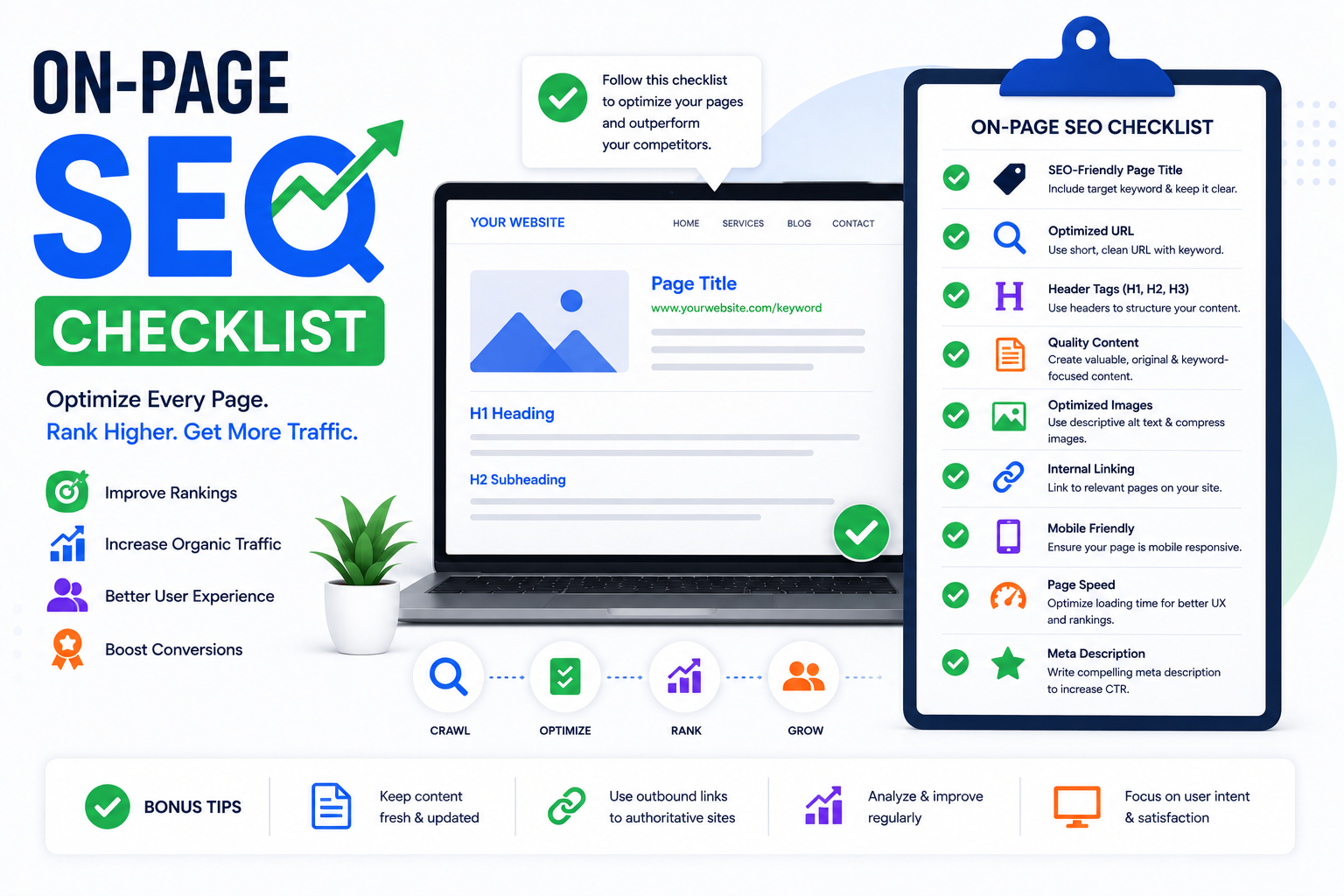
1. Title tag sits between 50 and 60 characters so it does not get cut off in results. 2. The primary keyword appears naturally near the start of the title. 3. The meta description is written to earn a click, not just describe the page. 4. Every page has a unique title, with no duplicates across the site. 5. The URL slug is short, readable and free of stop words.
Semrush notes that meta descriptions only display in search results around 28 percent of the time, since Google often generates its own snippet instead. Writing a strong one still matters for the cases where it does show, and it forces you to sharpen the page’s core message regardless.
Canonical tags belong in this group too, even though they rarely get discussed. If a page exists at more than one URL, a canonical tag tells search engines which version should be indexed, preventing the two from competing against each other in results.
It is worth doing a quick search for your exact title in quotation marks before publishing, just to confirm nothing else on the site is already using it. Duplicate titles are a surprisingly common issue on sites with dozens of similar service pages.
Content Structure (Points 6 to 10)
Structure is where most rushed pages fall down. Good information gets buried under a wall of unbroken text with no clear hierarchy.
6. One H1 per page, matching the title’s intent. 7. H2s and H3s used in a logical, nested order. 8. Paragraphs kept short, ideally two to four sentences. 9. The primary keyword and natural variants appear a handful of times, not stuffed. 10. The content actually answers the search intent behind the target query, not just mentions it.
That last point is easy to skip when writing to a word count target instead of a reader’s actual question. A shorter page that fully answers the query usually outperforms a longer one that circles around it.
Reading the piece out loud is an old trick that still works well here. Sentences that are hard to say in one breath are usually too long, and paragraphs that feel like a lecture on the page tend to feel the same way to a reader scrolling on their phone.
It also helps to compare your draft against the pages currently ranking for your target keyword. If every competing result covers a subtopic your draft skips, that gap is worth closing before publishing rather than after.
| Checklist Group | Points Covered | Most Commonly Missed |
|---|---|---|
| Title and meta data | 1 to 5 | Duplicate title tags |
| Content structure | 6 to 10 | Matching search intent fully |
| Images and media | 11 to 14 | Descriptive alt text |
| Links | 15 to 18 | Internal links to related pages |
| Technical basics | 19 to 21 | Mobile preview check |
Swipe to scroll the table on mobile
Images and Media (Points 11 to 14)
Images are one of the most consistently skipped sections on an on-page SEO checklist, mainly because they get added last and reviewed least.
11. Every image has descriptive alt text, written for a person who cannot see it. 12. File names describe the image rather than reading like a camera export. 13. Images are compressed so they do not slow the page down. 14. Any decorative images that add nothing are removed rather than left in for padding.
Google’s own documentation is clear that alt text should describe the image naturally rather than being stuffed with keywords, since that both helps accessibility and avoids looking spammy to search engines.
Title and meta data reviewed for length and uniqueness
Content checked against real search intent, not a word count
Images compressed with descriptive alt text added
Links and technical basics confirmed before publish
Working through these four groups in order keeps the review fast without skipping anything that actually matters for rankings.
Not sure your pages are hitting every point?
Get a free review of a handful of your existing pages.
Does your last published page pass the checklist?
Tick anything you are not confident about.
Links (Points 15 to 18)
Linking is where an on-page SEO checklist earns its keep the most, since it is almost always skipped when a page is written in isolation.
15. At least two or three internal links to genuinely related pages. 16. Anchor text describes the destination rather than saying “click here”. 17. At least one older page updated to link to the new one, so link equity flows both ways. 18. Any external links point to credible, relevant sources rather than random citations.
DigiFix builds internal linking into every content plan we run, connecting new pages back to relevant service pages like SEO services and the DigiFix SEO blog rather than leaving new content stranded with no connections.
It is worth running a quick broken link check on older pages every few months too. Sites restructured over the years often accumulate links pointing at pages that no longer exist, which wastes the value those links were meant to pass through.
Outbound links deserve a second look as well. A link to a source that has since gone offline, or been bought out and repurposed into something unrelated, can quietly undermine the credibility of an otherwise solid page.

Technical Basics (Points 19 to 21)
The final group covers the items easiest to forget because they live outside the content editor itself.
19. The page is set to index, not accidentally marked noindex. 20. A quick mobile preview confirms nothing is cut off or overlapping. 21. Page load speed has been spot-checked, especially if new images were added.
Point 19 sounds trivial until it happens once. A page accidentally left on noindex after a staging build, or one that inherited the wrong setting from a template, can sit invisible to Google for weeks before anyone notices traffic never arrived.
Mobile preview checks matter more each year as more search traffic shifts to phones. A layout that looks polished on a wide desktop monitor can easily hide a broken button or an overlapping heading on a smaller screen.
Ahrefs’ research into ranking factors confirms title tags remain a small but real signal, and the same holds for the other basics covered here. None of these 21 points is individually huge, but skipping several at once adds up to a page that struggles unnecessarily.
A quick note on process. DigiFix treats this list as a final gate before anything goes live, not a set of ideals to aim for eventually. You can read more about how our team approaches content on the About DigiFix page.
How to Build This Into Your Workflow
A checklist only works if it is actually used, which usually means turning it into something concrete rather than a document nobody opens. A shared template, a pinned card in your project tool, or a simple pre-publish form all work well.
Assign the final check to someone other than the writer wherever possible. A second set of eyes catches things the original author has read past a dozen times and stopped noticing.
For teams publishing at volume, batching the technical checks, alt text, canonical tags, mobile preview, into a single pass across several pages at once is often faster than checking each page individually as it goes live.
Revisit the checklist itself every few months too. Search engines change what they reward over time, and a list built two years ago may already be missing a point or two that matters today.
Want a second set of eyes on your content?
Book a free, no-obligation consultation and DigiFix will walk through your publishing process with you.